Error has occurred!
- KB457
- Nov 25, 2025 07:58 AM
How do I change the page view in full screen mode?
Question
How do I change the the page view in fullscreen mode?
Resolution
Hover the mouse over the bottom right corner of the screen, then click the Page Layout button:
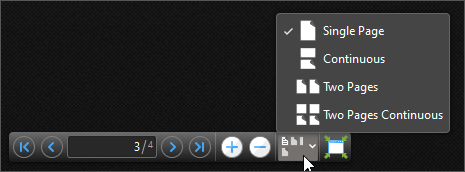
Note that you can add hotkeys to enable/disable these page view options, as detailed below.
Click the Help tab, then click Customize Toolbars.
In the Customze Toolbars dialog box, click the Commands tab and then search for the desired page view setting (Single Page, Continuous, Two Pages, or Two Pages Continuous).
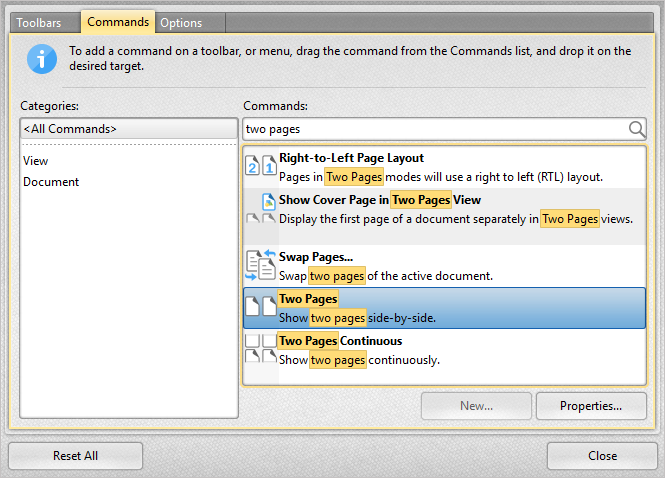
Select the desired function and click Properties:
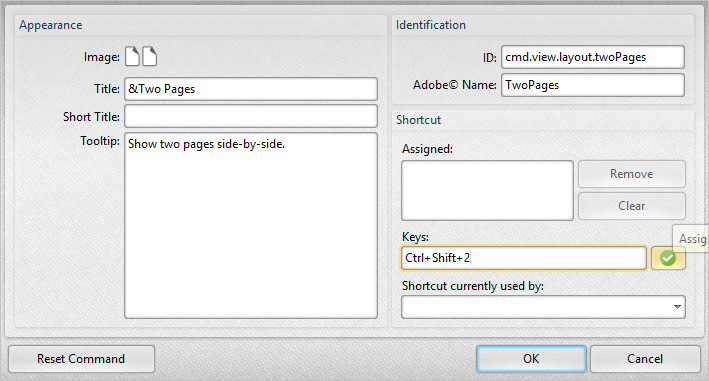
Specify the desired keyboard shortcut then press the green check mark to verify it. In this the example, Ctrl+Shift+2 is used.
Note that If the shortcut is already in use, you will be notified in the designated text box.
Repeat these steps with all page view functions you will need in fullscreen mode.
You can use the shortcuts at any time in full screen mode.
**Note, most keyboard shortcuts function in full screen mode. For instructions on how to use all the features available for full screen mode, please see the following article: https://www.pdf-xchange.com/knowledgebase/455
More Like This
- KB#456: How Do I Customize toolbars in PDF-XChange Editor?
- KB#282: Why won't the "Email Document" feature work in conjunction with Microsoft Outlook?
- KB#338: What are the MSI installation switch options for the PDF-XChange family of products?
- KB#447: How do I determine what version I should install/how can I retrieve my serial key?
- KB#431: How do I add new Languages to the Editor Spellchecker?